Design extraordinary spaces.
Operate them forever.

One web-based platform to design dynamic lighting and media installs — and run them for years, from any browser.

Show control system Content engine Install partner
One platform, every install Dashboard · Live device health · Any browser
What is Lightpath?

One platform for designing and operating dynamic spaces.

Lightpath is a web-based platform for designing and operating dynamic lighting and media experiences. Everything about it is built for permanence: installs that run for years and pass from the team that builds them to the people who run them every day.

Content management, real-time generative visuals, fleet-wide monitoring, and intuitive scheduling, all in one interface. Accessible from a browser, phone, or any internet-connected device.
Hosted on the on-site server Reachable securely from any browser Nothing to host yourself
The whole lifecycle

Design and operate from one platform.

Traditional show software is built for the experts who design a system. Lightpath is built for everyone who has to live with it: the designer on day one, and the marketing team, facility manager, and owner on day two thousand. The full power of a custom-built installation, behind an interface a client can actually use.

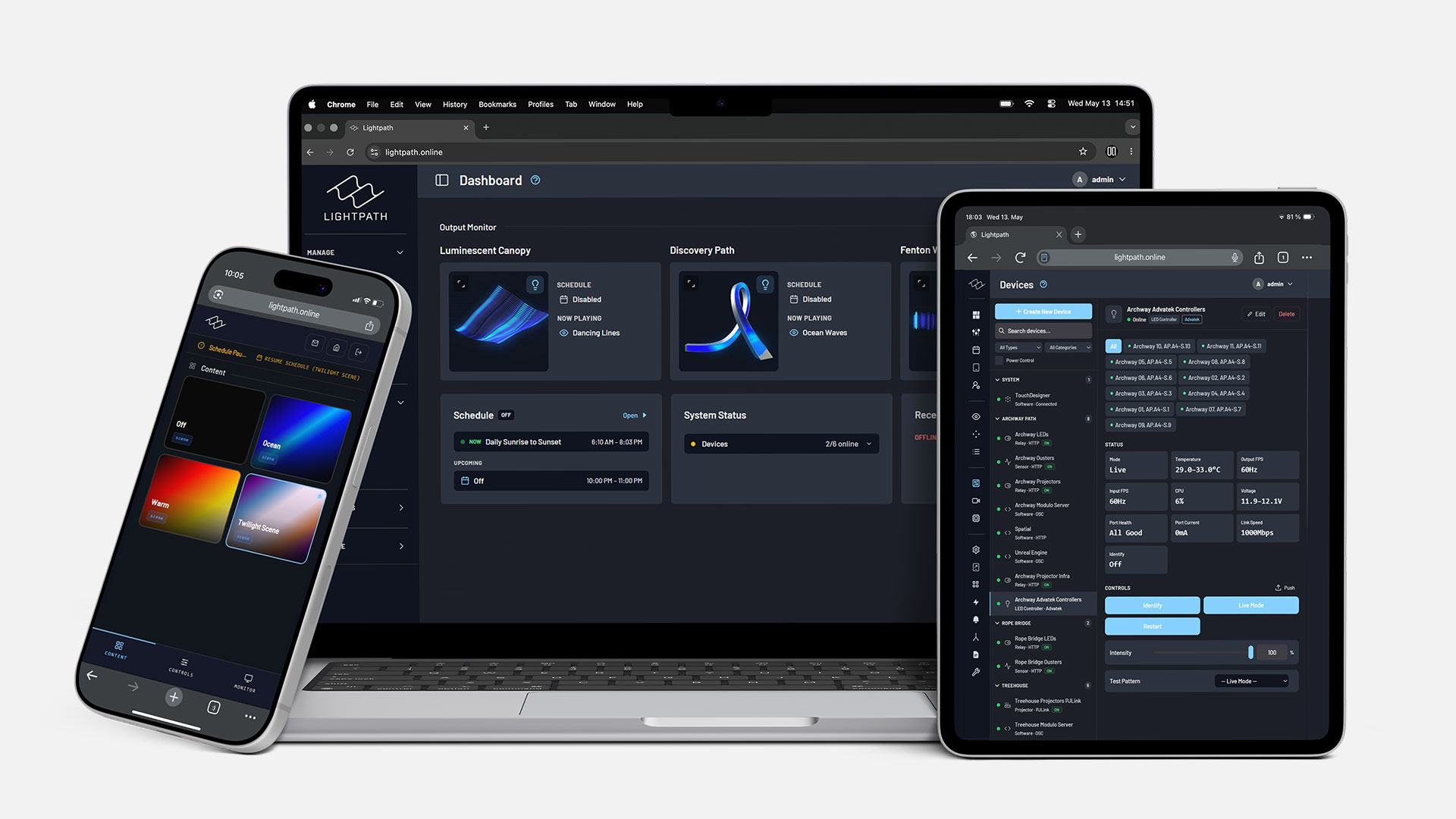
Lightpath running in a browser on a laptop, tablet and phone
User flows

Every user, exactly what they need.

Role-based access means every user sees only what they need and nothing more. As the studio, you decide who gets what, from a developer with the full toolset to a client with a single button.

Designers & Developers

Build the install

Pixel mapping, custom TouchDesigner plugins for content and interactivity, device setup, and alerts.

Extensible by design

Add sources, effects, sensors, and API data as each project needs.

Scale and integrate

Multi-machine rendering, manage other processes, and fit Lightpath into your existing stack.

Marketing & Client

A custom UI per client

A simple, tailored interface with only the controls they need.

Guided every step

Create content and set schedules through simple, step-by-step flows, no training needed.

Change it in a click

Swap colors or looks for a holiday in seconds.

Facility Managers

See it at a glance

One dashboard for the health of the whole install.

Get alerted

Know the moment something needs attention.

Operate from a custom UI

A control interface built for everyday operation.

One install, gated per role
01 — Create
Real-time content

Author content live, right in the browser.

Content authoring is a bottleneck for most studios: slow export loops, remote-update pain, pipelines only one person can touch. Lightpath makes it live. Any source streams straight to the browser with parameters to tweak on the fly, so you see exactly how a look reads as you build it.

  • Real-time pre-vis: TouchDesigner streamed to your browser — author looks live, no export.
  • Brand palettes: save a client's exact colors and restyle any look in seconds.
  • Bring your own media: upload files, or pull in NDI and Spout from the rest of the stack.
  • AI Studio (beta): prompt new content for the install, in real time or as offline video.
Explore Create
Live output Luminescent CanopyFireworks
Author it live.
Every change streams straight to the install. No export, no re-render.
Source
Fireworks_Loop
waves
Effect
+ Twist
Dry / Wet Mix1.00
Palette
Ocean Waves
Content engine. The render on the left is the real product output, recorded live. applied · live
02 — Manage
Daily operation

Daily control, at a glance.

One dashboard for the whole install: what's live, what's scheduled, what needs attention. Assign content, set sunrise-and-sunset schedules, and watch fleet health — from any browser, phone, or a kiosk with a single button.

  • Live dashboard: device health and active looks across the whole install, in real time.
  • Scheduling: "come on 30 minutes before sunset" is the whole instruction — triggers, calendars, and actions fire on their own.
  • Role-based UIs: hand a client a tailored interface with only the controls they need.
Explore Manage
Dashboard Ddemo
Output Monitor
Luminescent Canopy
Schedule Disabled Now playing Fireworks
Discovery Path
Schedule Enabled Now playing Twilight Ribbon
Fenton Wall
Schedule Disabled Now playing Minimal Warm
ScheduleMIXED Open
NOW Daily Sunrise to Sunset5:58 AM – 8:33 PM
Upcoming
Off10:00 PM – 11:00 PM
System Status
Devices 12/12 online 11/12 online
Recent AlertsView All
OFFLINERESTORED Power Relay Mar 22 05:01 AM
No recent alerts.
03 — Integrate
Interoperability & monitoring

Works with the tools you already use.

Lightpath is one hub for the whole stack. It speaks the protocols you already run, and watches every device continuously — telemetry, multi-condition alerts, and a grace period so it fires on real problems, not noise. The difference between a call you make and a call you take.

  • Control and monitor anything over OSC, HTTP REST, Art-Net, sACN, NDI, Spout, PJLink, Socket.IO.
  • Runs alongside ISAAC, Advatek, Unreal, and Modulo Pi — your whole stack or just a few roles.
  • Alerts to Slack, Telegram, or email before showtime; backup mode kicks in automatically.
OSCHTTP RESTArt-Net sACNNDISpout ISAACAdvatekUnreal
Explore integrations
Live output Luminescent CanopyTwilight Noise Nominal Backup look · holding
Health monitoring.
Every device, heartbeat-checked around the clock.
Heartbeat · every 30s
LED Facade12ms
Power Relay 14msno response
Media Server6ms
OFFLINERESTORED Power Relay 7:42 PM
Grace period elapsed. Routed to the install team.
Slack Telegram Email
Backup mode active. The space keeps running.
Proactive monitoring. The render on the left is the real product output, recorded live. heartbeat · every 30s
04 — Build
Developer layer

TouchDesigner, streamlined.

You build only what's unique to your install — patterns, outputs, sensor logic — and inherit the entire operational layer out of the box. Drop in .tox outputs and plugins, and Lightpath auto-exposes your custom parameters to the web UI. Your network, their interface.

  • A simple contract: .tox outputs and plugins expose their parameters to the web UI automatically.
  • Keep TD's full power: any geometry, any hardware, any sensor — your components, your freedom.
  • Survives the handoff: a shared structure that stays maintainable years after the build team leaves.
Explore Build
demo.lightpath.online/build · TouchDesigner outputs
Why Lightpath exists

Born from real installs.

Lightpath grew out of the custom installations Digital Ambiance builds: unique, one-off systems that still need to be supported and controlled years later. Every feature exists because a real install needed it, and every install DA ships runs on it. It unifies the complex work behind a custom install into a single system the customer can understand, without giving up any of the custom capability.

The everyday asks Lightpath was built to answer, no technical knowledge required:

"Change the colors for the holidays."
"Schedule this look to come on 30 minutes before sunset."
"Is the installation actually working right now?"
"Give the CEO a tablet with just a few buttons."
Trusted on installs that run every day
Case study

Projection, lighting, and spatial sound, as one experience.

The Lagunitas Experience is a permanent outdoor installation in Northern California: projection, architectural lighting, and 3D spatial audio, all real-time interactive, driven by live LiDAR and sensor data, all orchestrated by Lightpath.

14
Projectors
5
LiDAR sensors driving live interactivity
30+
Devices monitored end to end
20+
Speakers of 3D spatial audio
1
Platform orchestrating it all
The Lagunitas Experience · Northern California
Full-width Lagunitas install film — drop footage here
Read the case study
For TouchDesigner studios

Turn any TouchDesigner project into a permanent install.

You build only what's unique to your install — patterns, outputs, sensor logic — and inherit the entire operational layer out of the box. You never pay for Lightpath: the client pays the license, and you set your own margin on top.

Lightpath for studios
FAQ

Your questions, answered.

What is Lightpath?

Lightpath is a unified platform for designing and operating permanent, dynamic architectural experiences. It combines advanced creative control with enterprise-grade reliability in a system built specifically for environments that must run every day.

Who is it for?

Lightpath is built for teams responsible for permanent architectural environments — including designers, integrators, facility managers, and owners — who need both creative flexibility and long-term operational confidence.

What are the key features?

Lightpath combines expressive content creation with enterprise-grade operations. Key capabilities include layered creative workflows, advanced scheduling and automation, system monitoring with proactive alerts, role-based access control, and seamless integration with existing AV and building control systems.

What problems does it solve?

Lightpath eliminates fragmented workflows, fragile handoffs, and systems that break down after commissioning. It brings complex pixel mapping, interactivity, and expressive architectural content into a single platform built for permanent operation — allowing installations to be designed, deployed, operated, and evolved without constant technical intervention.

Why does it matter?

Permanent installations are long-term investments. Lightpath matters because it protects those investments — ensuring complex, expressive environments remain reliable, manageable, and adaptable long after opening day.

Show Control & Content OS
See it live.
demo.lightpath.online
  1. We send you the pricing calculator for your installation.
  2. We set up a demo unit in your office, hook it to a projector, and let your team get hands-on.
  3. We hand your sales team the enablement assets to talk about Lightpath with clients.
  4. Book a setup walkthrough and we build your first project together.
Schedule a demo